Ollama's OpenAI-Compatible Endpoint: What Your Agent Framework Actually Gets
Agent frameworks mostly assume OpenAI chat completions. What that contract looks like on a local machine: which /v1 routes Ollama v1 serves, which request fields are honored vs quietly dropped, context control by model aliasing, and where direct llama.cpp starts to pay.

Every agent framework you have probably tried—OpenClaw, Claude Code, Codex frontends, a pile of custom Python glue—assumes an OpenAI chat completions endpoint. Point it at a URL and a model name, and it works. That is why Ollama ships one too: the /v1 routes speak enough of the OpenAI protocol that your existing tooling can talk to local models without any changes on the client side.
This article maps what that layer actually gives you, sourced from Ollama’s official documentation rather than a blog post about it: which endpoints exist, which request fields are honored and which the docs mark as not supported, how tool-call loops travel through the wrapper, how to pin a context window per model instead of per call, and where dropping down to a direct endpoint starts to pay off. The goal is a clean contract map: when your agent fails at 2am, you should know which assumption broke.
The two-line wiring
If any of your tooling already uses an OpenAI client, the entire migration is one constructor argument:
from openai import OpenAI

client = OpenAI(
    base_url='http://localhost:11434/v1/',
    api_key="ollama",  # required but ignored
)
Two details in that snippet matter. The api_key is there because OpenAI clients refuse to initialize without one; Ollama’s own documentation examples pass the literal string "ollama", and any value works — the server ignores whatever arrives. Second, failure at this layer has exactly two shapes: nothing listening on port 11434 (start it with ollama serve), or your request names a model that is not actually pulled locally (check with ollama list). Whatever the endpoint does produce stays on the machine; this is protocol translation, not a proxy.
Other protocols Ollama serves
Ollama also provides its own Anthropic-compatible /v1/messages: set ANTHROPIC_BASE_URL=http://localhost:11434 (no trailing /v1/) plus a dummy auth token, and tools that assume Claude’s API — most famously Claude Code, whose setup is covered in depth in an earlier post on running it against a local model via Ollama— connect through it. Match the protocol to what your framework assumes: when you write code yourself, or when tools disagree with each other, the OpenAI-compatible routes covered below are where most general-purpose agent stacks land.
Endpoint inventory under /v1
| Route | Status and role in practice |
|---|---|
/v1/chat/completions | The main event. Streaming, JSON mode, reproducible outputs (fixed seed), base64-encoded vision input, tool calling, and reasoning/thinking controls for thinking models — the ones your agent loop will actually run on. |
/v1/responses | Newer surface: documented as added in Ollama v0.13.3. Carries input, system instructions, tools, streaming with reasoning summaries (for thinking models) — but only the stateless flavor; more below. |
/v1/completions | The legacy completions endpoint with a string prompt. Perfectly fine for one-shot fills; awkward as the transport for multi-turn agent loops. |
/v1/embeddings | String or array-of-strings input, documented encoding-format and dimension parameters — so a RAG pipeline can keep chat and embeddings on the same local server without bolting on a second stack. |
The practical framing: if your workflow runs the same agent behind Ollama today and an OpenAI-compatible point later, this four-route surface is the stable part — swap one base_url, keep the request code. A fifth route worth knowing sits outside /v1: the native /api/... endpoints remain available on the same server, and that is where model lifecycle control lives (see context section).
Which request fields actually work at /v1/chat/completions
This is the part of Ollama’s documentation most write-ups skip. The compatibility layer publishes a field-by-field checklist for /v1/chat/completions; fields marked as not supported there are, on standard OpenAI-compatible servers, dropped rather than enforced — exactly where local setups tend to hide their surprises:
| Ollama field | Status in the OpenAI-compatible layer (per docs) |
|---|---|
model, messages | Supported, including image content as base64 and the array of “parts” form for message content. (One limitation on vision inputs is called out at the bottom of this table.) |
temperature, top_p, frequency_penalty, presence_penalty | Listed as supported sampling controls. |
seed | The documented route to reproducible outputs: same inputs, seed, and model on the same machine give you a comparable output — which is what makes regression-checking prompt edits locally possible instead of vibes. |
stop, n | stop sequences are supported; parallel completions via n in one request are not — loop on the client side if you need variants. |
tools | Supported — this is what makes the endpoint usable for agents at all. A full round-trip works out in the next section. |
tool_choice | Marked not supported by the compatibility layer: there is no sanctioned way to force, forbid, or gate specific tool calls per request. Clients that build on forced-call semantics lose that behavior locally — which is a capability gap to design around, not an upgrade fix. |
response_format | Supported: JSON mode and structured-output schemas — a dedicated section below shows the request shape that works, plus one documented caveat about Ollama’s cloud service. |
reasoning_effort | Accepted values: high, medium, low, max, none — the lever for thinking models, covered in its own section below. |
stream_options.include_usage | Supported: streaming with usage accounting instead of estimating token counts from response bytes (handy in long agent runs). |
| Vision input via remote image URL | Base64-embedded images and text parts are supported; passing a plain image_url reference to the server and letting it fetch is listed as not supported. If your pipeline hands frameworks URLs, download them client-side and embed — a quiet capability gap, in practice the kind that surfaces only when it bites. |
The takeaway from that table is discipline, not panic: “not supported” in the docs means do not build logic on top of it. If you previously ran the same request code against a cloud host where those fields existed and then pointed it at Ollama without re-testing field by field locally, any branch that depended on one of them will simply never fire — nothing will tell you it is missing.
Tool-call round-trip through the compatibility layer
The agent loop itself is untouched OpenAI shape: you pass tools, and when a model opts to use one, it responds with an assistant message carrying tool_calls; you execute them locally and append role-tool messages. What that looks like through the Python SDK on top of Ollama:
def get_weather(city):
    """Get the current temperature for a city."""
    known = {"New York": "21 C", "London": "14 C"}
    return known.get(city, "no data")

tools = [
{"type": "function", "function": {
   "name": "get_weather",
   "description": "Get the current temperature for a city.",
   "parameters": {"type": "object",
                  "properties": {"city": {"type": "string"}},
                  "required": ["city"]}}}
]

messages = [{'role': 'user', 'content': 'What is the weather in New York?'}]
while True:
    resp = client.chat.completions.create(
        model='qwen3:8b', messages=messages, tools=tools)
    msg = resp.choices[0].message
    if not msg.tool_calls:          # no more calls -> final answer
        print(msg.content)
        break
    messages.append(msg)            # assistant tool-call request
    for call in msg.tool_calls:     # one turn can carry several in parallel
        result = get_weather(call.function.arguments['city'])
        messages.append({'role': 'tool', 'tool_call_id': call.id, 'content': str(result)})
Three caveats from the documentation that are worth knowing before 2am. First, parallel tool calls: a single response can carry several tool_calls, so execute all of them in one turn before generating again — assuming one call per round is what makes it silently break multi-city questions. Second, which models actually hold up under this pattern is model-dependent, not endpoint-dependent: Ollama’s docs demonstrate the loop with tool-capable families (its examples use qwen3), but a small model will still call tools and it just breaks argument format or stops early more often. Test your tool schema against the exact model you plan to run, not the largest one you happened to pull for something else. Third: if you stream (which most agent UIs do by default), gather every chunk of thinking, content, and partial tool_calls before treating a turn as complete — tool calls arrive split across multiple chunks mid-stream, and dropping the last one means you never dispatch it.
Structured outputs via /v1: JSON mode and schemas
Ollama’s native API has its own format — the string value "json" or a full JSON schema that constrains every generated response to match. The docs explicitly note this works through the OpenAI-compatible API via response_format, so local tooling that already speaks standard chat completes gets constrained output without switching clients:
import requests

r = requests.post(
    'http://localhost:11434/v1/chat/completions',
    json={
        'model': 'qwen3:8b',        'messages': [{'role': 'user', 'content':
                     'Classify this ticket and summarize the issue.'}],
        'response_format': {
            'type': 'json_schema',
            'json_schema': {'name': 'ticket_summary', 'schema':
                {'type': 'object',
                 'properties': {'summary': {'type': 'string'},
                              'category': {'type': 'string'}},
                        "required": ["summary", "category"]}},
        }

    }, headers={'Content-Type': 'application/json'})
The documentation’s own tips section translates directly to local practice: keep temperature low (it suggests 0) when you depend on conformance, and if you are passing a schema, also put that same schema in the prompt as text so the model has it grounded while generating — shape-conformant is not the same thing as semantically right. Do one code layer of validation against whatever returns (pydantic or zod) before anything builds on top.
One asymmetry worth naming at that point: Ollama’s documentation specifically notes its cloud service currently does not support structured outputs — the schema-constrained behavior in this section is a local (and self-hosted) capability, which means moving an agent from home metal to their hosted API has more of an output-robustness story than your test suite would first suspect.
Thinking over /v1: budget the reasoning effort explicitly
If part of what you are running thinks before answering, that deliberation costs exactly like normal generated tokens in local inference terms — VRAM-resident time per token with no server-side amortization to save it. The compatibility layer exposes reasoning_effort (levels above) and the nested reasoning.effort form, plus reasoning summaries that arrive on /v1/responses for thinking models if you want to show users or log what was happening in there, not just what it decided. The practical guidance is the same as anywhere else: set effort per task class in a framework configuration (an aggressive loop at low, a hard-reasoning turn only when that specific call needs it), because max has no automatic ceiling — however much you send gets spent token-for-token on your own hardware.
Context windows are per-model, not per-request in Ollama’s compat layer
This is where the OpenAI shape and reality at home actually disagree. The OpenAI API never offers a field to ask for more context window, so the compatibility layer does not add one either — which means an agent whose conversation grows past its model’s default budget can hit truncation deep in history with no request-side setting left to change. Ollama’s documented answer: model aliases.
# myagent.modelfile
FROM qwen3:8b
PARAMETER num_ctx 32768
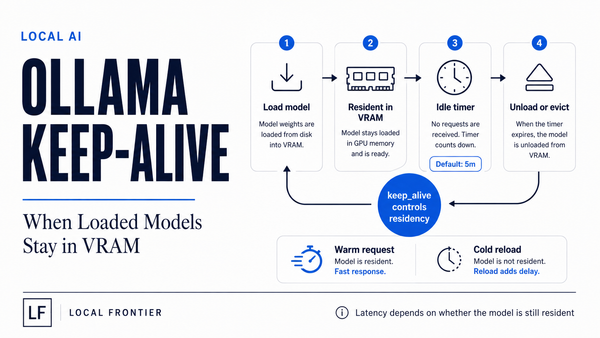
ollama create myagent -f myagent.modelfileThe agent then passes model="myagent". Nothing downstream changes — same endpoint, same protocol — but the model named in that alias serves a different context budget. Two cautions: bigger windows grow memory cost for KV cache roughly linearly per layer and per token (for exactly how to compute what you can fit from hardware, see my post on budgeting VRAM/RAM/CPU for local agent workloads); the default unload behavior keeps a loaded model resident for five minutes after its last request before freeing it back (that is the native API’s keep_alive, documented at 5m and settable per call). And if you want Ollama-side configuration knobs rather than just context, an earlier field report walks exactly this kind of pinning: Ollama settings that matter on a specific local model.
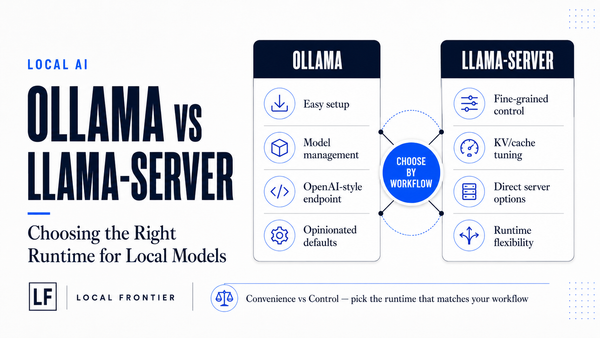
When Ollama is enough (and when it starts to stop being)
The compatibility layer is not the constraint you are trying to escape for most agent workloads by definition — local AI with your existing tooling wants exactly this. It stops paying off once one of these becomes true:
- You need per-request control over model lifecycle (unload immediately, pin resident), which OpenAI-shape fields carry and Ollama’s documented place is the native side.
- Your workload genuinely competes for concurrent requests — more than one interactive session sharing a machine with tight memory — or starts reasoning about KV cache arithmetic you cannot drive from a wrapper: that is
llama.cpp’s territory (the engine running under Ollama and many wrappers), which a dedicated article on this site goes through before recommending anyone expose one of them. - You find yourself re-implementing native
/api/chatbehavior that already exists — fine-grained field tuning the compat table does not list — and building direct-mode paths for those calls alongside wrapper ones.
The opposite direction also holds: do not move off Ollama out of habit because it felt like there was a missing knob when what you actually needed was one num_ctx alias or a reasoning_effort value — the wrapper here costs nothing, and hand-driving llama.cpp adds its own operational surface (bind address, auth defaults) that you manage yourself. That is a genuinely good trade for a few cases; it is not the default state for every setup.
Conclusion
Ollama’s OpenAI-compatible layer covers, per its own documentation: /v1/chat/completions, /v1/responses (stateless flavor only — no server-side conversation objects), /v1/completions, and /v1/embeddings. The request fields an agent loop depends on — messages, tools, seed, stop sequences, JSON mode and structured schemas, streaming with usage, base64 vision, reasoning-effort control — are the support surface. Fields marked as unsupported in that table: tool_choice, per-token logit bias, remote image URLs, parallel completions via n, and user identity. Context window is a model alias rather than a request field. Thinking-model budget goes through reasoning_effort. If your tool truly needs any of the missing fields per-request — or concurrent slots to hand-wave about — that is the decision point for dropping down directly to llama.cpp (covered on this site as its own article): everything else runs exactly like an OpenAI endpoint, one line apart.