How Much Hardware Do You Need for Local AI Agents? A Practical VRAM, RAM, and CPU Guide
A practical sizing guide for running sustained local AI agent workloads: what 8 to 48 GB+ of VRAM really buys you, plus the system RAM and CPU decisions that come with each tier.

The short version: VRAM is the gatekeeper, but not the only budget. A model file downloaded at roughly 15 GiB does not imply it will need only about that much VRAM to run: beyond the weights themselves, runtime memory also includes a KV cache (whose size grows with context length) and other framework overhead that is hard to pin down without measuring. This guide walks through what is realistically possible at each common VRAM tier — from 8 GB to 48 GB+ — with an emphasis not on "can it load?" but on whether you can actually run sustained agent workloads: long contexts, tool calls, multimodal input, and the headroom that separates a usable machine from one where every session ends in overflow.
Why AI Agents Need More Memory Than Simple Local Chat
A casual chat session is forgiving. You ask, it answers, the conversation stays short, and even an undersized setup mostly gets by. An agent workload multiplies memory pressure along several axes at once:
- Context accumulates instead of resetting. Agent frameworks keep system prompts, tool definitions, prior observations, file contents, and command output in the active context for hours. A 32-token Q&A exchange becomes a 100k-token working set. Memory used for runtime state (the KV cache) grows with every token in that window — more on this below.
- The work is sustained. You are not measuring whether one message completes; you need tokens flowing at acceptable speed across hundreds of turns, possibly overnight. Runtime overhead that a short test never exposes — allocator fragmentation, batch scheduling, resident tool plugins — matters here.
- Multimodal input adds its own budget. Screenshots, images, and video frames each add encoder weights (a separate projection file) plus per-image activation memory while being processed.
- Agents do work alongside the model. On a local box the agent runtime itself — Python processes, browser automation, build tools, databases — shares RAM with inference. Cloud providers hide this; your machine does not.
The practical consequence: size for context and headroom first, raw model compatibility second.
VRAM Is Usually the Main Constraint
Model weights dominate memory on every mainstream local runtime (Ollama, llama.cpp, LM Studio), so VRAM usually determines which class of model you can keep fully resident. The important nuance is what "fits" actually means. Two terms get conflated constantly:
| Term | What it measures |
|---|---|
| Model file / weight size | The download — e.g., a Q4_K_M GGUF listed as 15.3 GiB [official repository metadata] |
| Runtime VRAM usage | Weights resident plus KV cache plus activations, framework buffers, and (for multimodal) encoder overhead while running |
Runtime memory is never smaller than the file it came from. What pushes it higher:
- KV cache. Every token in your context window leaves an entry in a key/value cache. In this derivation that comes out to roughly (KV-cache heads × head dimension × dtype bytes × 2 for K and V), summed over the full-attention layers only. Grouped-key-value designs shrink it relative to a naive total-head-count estimate, and hybrid-attention architectures shrink it further because their linear-attention layers do not grow with sequence length. This is derived arithmetic — the formula follows from model config fields, not a measurement I ran.
- Working-set overhead. Attention buffers, sampler state, CUDA runtime allocations: typically on the order of 0.5–1+ GiB for common runtimes before any context is loaded (configuration-dependent).
- Multimodal components add memory pressure of their own: the vision encoder/projector file joins the resident set, and each frame of image or video input adds processing overhead on top of that.
A concrete worked example, derived from officially published architecture fields for a hybrid model in the 27B class (64 layers, one in every four full-attention — 16 total; 4 key/value heads; head dimension 256): at bf16 KV dtype the cache costs roughly 64 KiB per token, so 8k tokens adds ~0.5 GiB, 32k tokens ~2 GiB, and a full 128k-token window ~8 GiB on top of the weights file [derived from official config.json fields; formula shown above]. Quantized KV caches (int8-class) roughly halve this at small quality cost. The same arithmetic on a dense transformer with all layers present would be several times larger for the same context — which is why two models with identical downloadable sizes can consume very different runtime memory as your session grows.
The rule that follows: budget VRAM as weights file + realistic max context + ~1 GiB overhead headroom, and check whether the sum leaves meaningful slack. On a card that is exactly full at load time, you are not running — you're throttling or offloading on every prompt.
What 8GB VRAM Can Realistically Do
(Example cards: RTX 3050/4060-class desktop GPUs and many laptop GPUs of the recent generation.)
- Practical model class: dense models in the ~4–9B parameter range at strong quantization (Q6 to Q8 for smaller ones, solid 4-bit classes for the top of the range). A 9B model's ~5 GiB-class 4-bit file is representative [official repository byte listing].
- Quantization choices: 4-bit and above are fine here — at this tier you can afford quality over capacity. Save the most aggressive compressions (3-bit) as a last resort, not the default.
- Context length: budget for modest windows on the order of 8–16k tokens unless you pick small models deliberately; beyond that the cache starts eating any remaining room.
- Agent workloads: real but tight. A chat-style agent with a compact system prompt and short sessions runs successfully. Sustained, long-context coding agents will hit context limits or need aggressive truncation early. Tool schemas count against your window too — lean tool definitions matter more at this tier than anywhere else.
- Multimodal: possible on small multimodal models; skip adding encoder files on the border-line fits.
- Headroom that matters: with an 8 GB card, even ~1–2 GiB of spare VRAM changes whether long sessions behave or collapse — this is the tier where headroom is scarcest relative to model size.
- Who should consider it: people evaluating local AI before committing to bigger hardware; light daily chat and short-horizon agent tasks. If agents are your primary use case, treat 8 GB as a demo card, not a base camp.
What 12GB VRAM Can Realistically Do
(Example card classes: the 8–12 GB laptop GPU class; some professional and AMD mid-tier SKUs land here too.)
- Model class: a comfortable step up from what an 8 GB card manages, with room to spare — ~7–9B models at Q8 or lossless near-lossless quants with real context headroom, and small MoE / sub-10B-class active-parameter models whose total files land in the ~5–6 GiB range [official byte listings].
- Quantization: default to 4-bit K-quants at minimum; Q8 of a mid-size model is often the better buy than a Q3 of a bigger one.
- Context: expect 16k–32k usable windows on solid fits — enough for most single-task agent sessions and real interactive coding loops.
- Agent workloads: realistic for focused, task-scoped agents (review a repo snapshot in pieces, handle a bounded pipeline). Large-file or all-history agents will still outrun the window; plan your context management accordingly rather than hoping.
- Who should consider it: users wanting dependable local chat plus occasional agent use without constant babysitting the first time they actually need headroom.
What 16GB VRAM Can Realistically Do
(Example cards: RTX 4060 Ti / RTX 5060 Ti-class at 16 GB; typical of many current mid-range laptop and desktop GPUs.)
- Model class: the interesting question at this tier is which side of the step you want: dense models up to ~9–12B with generous context, or a reach for 20–30B-class files where the math starts getting tight.
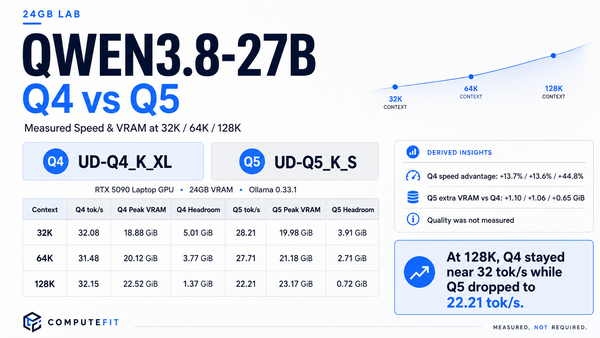
- The honest arithmetic: a 15 GiB-class file (the standard 4-bit build of the current open front-line ~27B models [official repository metadata]) leaves well under 1 GiB of 16 GB for everything else — that is not workable headroom, only a technically-loadable one. The site's own analysis of precisely this model recommends smaller-quants on a forced fit and calls them the test point rather than the comfortable point. Which File Actually Fits Your GPU
- Quantization: 4-bit K-quants are the main character here; Q5/Q6 of smaller models is often smarter than Q3/Q4 of larger ones — prefer model-fit you don't have to watch.
- Context: 8k–16k windows on comfortable fits (the ~9B tier), less once you push into borderline big-model territory. Hybrid-attention models go further per GiB of remaining room [inference from architecture; see the formula above].
- Agent workloads: realistic in the "run a genuine agent daily" sense on 7–12B-class models with discipline about context scope. Sustained large-model agents at this VRAM level are running against the edge — possible, but every session that grows (new file pulled in, longer history) is one you're actively managing rather than trusting.
- Who should consider it: most people buying a first local-AI machine who still want agent capability; if sustained serious agent work is the goal and budget allows, 16 GB is the floor you will feel, not the tier you relax into.
Why 24GB VRAM Is a Particularly Useful Tier
(Example cards: RTX 3090/4090-class desktops, flagship laptop GPUs of recent generations.)
- Model class: this is where current front-line dense models in the ~27–35B range stop being projects and start being workbenches. A 15 GiB-class Q4_K_M file leaves roughly 7–8 GiB for KV cache plus overhead — on a hybrid-attention architecture that comfortably covers 64k+ token windows (the worked arithmetic above: ~4 GiB of bf16 KV at 64k tokens), and several multiples with quantized caches.
- The agent math works. Sustained tool-using sessions, multi-file coding workloads, long-running automation — the "real" local AI agent use case documented in detail in this site's experience running agents on a 24 GB machine.
- Multimodal fits without compromise. Encoder/projection files (~1 GiB-class downloads) plus image processing overhead leave the remaining budget still agent-viable [official byte listings for vision components]; see our breakdown of what images and video actually cost.
- Quantization choice becomes a lever, not a necessity. You can start from quality first — 4-bit high-end or selective Q5/Q6 in sensitive spots — and trade down only if context demands it. This is the opposite posture of every tier below: at ≤16 GB you choose quant for capacity; at 24 GB you choose context/quality balance after fitting comfortably.
- MoE sweet spot. A 30B-class MoE model whose vendor-published target hardware is exactly "24 GB VRAM" (K-Quant build) lands here by design [vendor model card] — a useful second data point beyond a single model family that this tier is where the ecosystem assumes you are.
- Headroom matters most mid-lifecycle. The 5–8 GiB of post-weight room is what lets you upgrade context expectations, add vision, and take on bigger tasks without buying hardware again. That's why upgrades tend to land here rather than at higher tiers first; see the analysis in Ornith-1.5 for Local AI: What a New MoE Family Means When Your GPU Fits One Model but Not Two — this card class is where "one model fits, two don't" stops being an excuse and becomes a configuration decision (run one primary model hot; keep the rest available but not concurrently active).
- Who should consider it: anyone whose stated use case includes genuine agent work, medium-to-long context, or multimodal input as more than an occasional experiment.
What Changes at 48GB and Above
(Example configurations: two consumer-class GPUs (2×24 GB), prosumer workstation cards of higher capacity, and professional GPUs with substantially larger VRAM capacities.)
- Model class: the boundary moves from "can I run a good model" to "can I run multiple models or one very large context." Q5/Q6/Q8 builds of 30–70B-class dense models move into single-box viability; whole-model offload starts to matter less as the dominant strategy.
- Context becomes a first-class workload. When weights stop consuming all available VRAM, long-context agent work — hundreds of thousands of tokens in one window — is no longer an engineering act but a routine mode with quantized KV [derived arithmetic per the formula above]. Frameworks that hold multi-session state become practical rather than theoretical.
- Multi-model deployment: at 48 GB+ you can keep a fast small model resident for triage and tool routing while a quality model serves generative steps; or run two workloads (one interactive, one batch/nightly) without constant thrash-through reload. This is the difference between "the box does AI" and "the box runs an agent system."
- Quantization: 4-bit as the default becomes optional now — you can plan around near-lossless at larger scale if quality matters more than speed or vice versa; both directions are accessible.
- RAM interplay (next section) relaxes. At this VRAM size even partial offload is a performance choice rather than an availability requirement, unless deliberately operating very large models that exceed two-box ceilings by design.
- Who should consider it: power users whose work is continuous agent operation, research-scale experimentation across several models simultaneously, or explicitly long-context processing as the primary job; organizations sharing one box among multiple tasks.
How Much System RAM You Need
VRAM gates what runs fast; system RAM gates whether things run at all once VRAM fills up:
- Fully-resident regime (model + working context fits in VRAM): RAM needs approach a normal workstation's — 16 GB is functional, 32 GB comfortable, with the agent runtime, OS, and tools as usual. You still don't want to swap pages during an hour-long coding session.
- Partial-offload regime (when the model file exceeds your VRAM): modern runtimes move layers that don't fit into system memory. It runs, but decoding with offloaded weights is meaningfully slower: expect substantial throughput degradation versus a fully-resident model, with the exact rate depending on the offload ratio, memory bandwidth, and runtime [observed behavior rather than a fixed measurement]. In this regime, capacity is also a real requirement. A practical lower bound is "model file size + working set," because every offloaded tensor has to be resident somewhere in RAM concurrently with the VRAM-resident ones for inference to proceed; 32–64 GB of DDR5-class memory is where most people land for 15–20 GiB-class models with partial offload, and higher beyond that.
- Batching / serving multi-request: runtimes with concurrent request handling scale working RAM accordingly — plan extra headroom if your agent framework issues parallel calls rather than strictly serial ones (many do not).
There's no authoritative published per-model system-RAM table from a first-party runtime vendor we located; the figures above are derived from component budgets (file sizes, cache requirements) and observed offload behavior. Treat them as sizing guidance, not specs — validate against your specific model/quant/context combination if this regime becomes primary for you rather than fallback.
How Much CPU Performance Matters
CPU performance is a second-order but non-zero constraint on local agent machines:
- When it's the bottleneck: pure-CPU inference (small models with no discrete GPU), offloaded layers in partial-offload runs, embedding-heavy prompt preparation before decoding starts.
- What actually helps: several strong cores (8 threads at a recent generation is comfortable; more helps for high-throughput serving configurations) and, notably, memory bandwidth — offloaded decoding throughput tracks RAM bandwidth much more than core count on mainstream DDR5 systems [observed behavior across runtimes; exact figures configuration-dependent].
- What doesn't help (as much as assumed): single-thread benchmark chasing. LLM inference is embarrassingly parallel in the matrix ops at typical batch levels; pick a reasonable modern CPU and spend remaining budget on VRAM/RAM/SSD before going exotic here.
For most readers: don't underbuy the CPU out of a belief that it's the deciding factor, but also don't over-pay for cores you will never push if VRAM is already sized appropriately for your models' needs. The ordering across common budget tiers tends to be: VRAM capacity ≫ system RAM ≥ storage speed > core count below ~24 GB VRAM; once past 24 GB, RAM and secondary GPU headroom move up in relative importance.
Storage Requirements
- Model files are genuinely large — repeatedly. A single 15 GiB quant is a representative download for popular open models, not an outlier [official repository byte listings]. Multiple quants per model is how people experiment (compare Q4/Q5, keep the encoder file, try newer revisions), and Ollama-family runtimes cache every blob until explicitly rebooted/cleaned up or deleted from cache — a directory you never think about can quietly hold tens of GiB across experiments [documented behavior: retrieved files remain cached until server restart].
- Practical floor: 512 GB NVMe comfortably holds the operating system plus several actively-used models with room to spare at 4-bit class; step up toward ~1 TB when keeping multiple high-quality quantizations (Q8-class), vision components across a few models, and datasets/prompts alongside.
- Speed matters less than class here: unlike training workloads or huge batches of concurrent requests, a modern NVMe's sequential bandwidth is rarely the practical gatekeeper for inference startup time at these sizes — but boot/loading your daily-driver model in seconds is still what separates "this feels instant" from "I'd rather not." A mainstream PCIe 4.0-class drive is plenty; spinning media belongs on cold-backup tiers not active model storage.
Example Hardware Profiles
Four realistic configurations, each framed by what it's good for rather than as a spec sheet:
Entry-Level Local AI Experimentation
- Box: recent-generation CPU (8–16 threads), 32 GB RAM, 512 GB NVMe, 8 GB VRAM GPU.
- Good for: confirming local-AI fit in your day-to-day; small-model chat; short task-scoped agent sessions; evaluating whether you'll outgrow the use case before committing further money to the box itself.
- Ceiling (known early): context length and concurrent workload — budget deliberately modest expectations about window size rather than discovering the ceiling mid-project, and use lean tool definitions as standard practice.
Comfortable Local Chat Machine
- Box: similar CPU/RAM/storage envelope above but with a 12–16 GB VRAM GPU; if you can spend extra on a larger card at this tier — that specific trade-off is walked through in the dedicated 16 GB section above — it generally buys more agent runway than any other choice in your remaining budget.
- Good for: dependable daily chat plus regular agent tasks scoped to single-workflow sessions; a solid machine if you want the reassurance of "it just works" without constant context tuning, with the model quality (and hence usefulness) noticeably better than entry level thanks to being able to keep higher quants resident.
- Ceiling: sustained long-context or large-model work as primary (not occasional) use — plan upgrades rather than workarounds if that's your actual job description for this box.
Serious Local AI Agent Workstation
- Box: recent multi-core CPU, 64 GB RAM, 1 TB NVMe, 24 GB VRAM GPU — the configuration class documented in our hands-on agent reporting rather than a paper config.
- Good for: this is the profile for exactly the question motivating this whole article: real, sustained, tool-using local AI agents; coding automation with files kept in active context across long sessions; multimodal workflows without compromising remaining budgets elsewhere on the machine; comfortable headroom to try newer model releases before they saturate card capacity.
- Why RAM/storage step up here too: agent runtimes don't live inside the model — your framework, its subprocesses, file watchers, browser profiles and build tooling all want a real system around them, not just a fast GPU bolted onto an otherwise minimal machine.
High-End Multi-Model / Large-Context Workstation
- Box: strong multi-core CPU (often paired with correspondingly more threads than a workstation at this VRAM tier would need purely for offload reasons — here it also supports concurrent serving overheads), 128 GB+ RAM, 2 TB NVMe or larger, either two high-capacity GPUs in one box or a single professional-card configuration reaching ~48–96 GB total available.
- Good for: running a small system rather than a chatbot — triage plus quality tiers resident simultaneously; long-context processing as an explicit primary workload; research-scale experimentation across model families without constantly clearing/loading weights overnight between attempts rather than during the work itself.
- Who should actually buy this: genuinely continuous agent operations or multi-user sharing in practice, not one-off projects that could rent equivalent capacity while working — see the site's runpod-vs-vast analysis of what makes renting economical in those cases instead of owning (RunPod vs Vast.ai for Local AI).
How to Choose Hardware for Your Use Case
A decision procedure that avoids the "which card should I buy" rabbit hole:
- Name your actual, sustained workload — not aspirational peak usage but what you will repeatedly run (task-scoped agents? long-context coding with files kept in memory? multimodal review work? occasional experimentation only?). This drives everything downstream more than anything else you'll decide later in this process.
- Translate one representative model/quant you expect to actually prefer from Step 1's workload class into file size (read the official repository listing — it is a number, not an estimate) rather than picking cards first and back-fitting to whatever happens to nearly load.
- Size VRAM as
file + realistic peak context (measured against the KV cost formula shown above for that architecture) + ~1 GiB working headroom, and choose the card tier whose capacity leaves meaningful slack above that sum — not merely reaches it. The difference between exactly-fits and comfortably-fits is whether your long sessions run in trust mode or monitor mode; that's usually worth more than saving a gear of card price to land right at zero surplus rather than some meaningful buffer over the total you computed. - Scale RAM from the result: if Step 3 fits with margin, treat the box like any good workstation (16–32 GB class for light continuous use; bump here anyway once agents become primary daily jobs). If Step 3 doesn't fit at your target quality/context level and you still want a single-box rather than rented answer, decide deliberately: drop to a smaller/quantized model file (cheapest), grow VRAM tier up next (the actual fix), or move that class of workload partially offloaded with an explicit speed budget accepted knowingly.
- Let your remaining budget go in the order established earlier — once Steps 3–4 are met: additional system RAM → storage size/speed → CPU uplift last, before you start optimizing CPU benchmark scores past what the inference step genuinely exercises at your batch levels rather than chasing peak cores that will sit underutilized.
- Revisit annually on model cadence, not hardware marketing cycles: model architecture shifts (hybrid attention as in current front-line releases; MoE mixes changing active-vs-total parameter ratios) move real costs per useful capability, and the specific numbers cited here for particular families will drift accordingly — the method above is durable even when this quarter's best-file-per-doll changes hands.
Conclusion
Local AI hardware questions keep tempting themselves into a false precision: "this file fits" gets treated as equivalent to "I can use it." The consistent, practical version of the answer across the tiers in this guide:
- 8 GB proves the concept; real agent workloads remain limited by context budget and thin headroom — suitable for evaluation and lightweight daily tasks rather than sustained primary agent operations.
- 12–16 GB lands the difference between demoable and dependable-for-real-chat with scope-limited agents; the borderline reach at exactly this ceiling (a 15 GiB-class file on a 16 GB card) fits only as a test point, not the comfortable default (per our earlier sizing analysis).
- 24 GB is where current-generation front-line local AI models and their honest agent workloads stop being engineering problems and start just working — quality quants, real context windows, multimodal without compromise, and documented sustainable usage patterns [this site's own reporting at exactly this hardware class].
- 48 GB+ changes the shape of what you're operating: multiple concurrent models, explicit long-context workloads as routine rather than exceptional, or a shift from "running one assistant" to running a small agent system with routing and batch capacity alongside it.
Whatever tier you settle on, apply three commitments going forward so the machine keeps working well rather than merely technically-loading more: budget file size + peak context + headroom before you purchase; verify what actually downloads versus what runs (they are different numbers by design, not an error); and treat sustained agent behavior over hours — not a single clean test run from an empty system prompt — as your real verification gate.