Qwen3.8-27B Vision: What Images and Video Actually Cost When You Run It Locally
Images work out of the box in Ollama. Verified against the model's shipped configs: what each image costs in tokens, what the projector adds on GGUFs, and exactly where my verification stops at video.

1. The short answer
- Images: yes, a straightforward fit. Qwen3.8-27B is natively “a vision-language model that understands images and videos” (vendor words, from its own Hugging Face model card). In Ollama the official tags list
Text + Imageinput — so screenshots, diagrams, photos, and document crops are a first-class citizen on your machine. - Local video through Ollama: not exposed here at time of writing. The registry listing shows Text and Image only, with no Video input field (a vendor doc surface — check the live page before you bet on it). If the model card’s local-video claim is what you actually need, section 5 explains where that leads.
- The cost of vision input is measurable up front: the patch/merge math means an image’s token bill is simply its resolution in megapixels — a few-megapixel screenshot costs a few thousand tokens, and no single image under that preprocessor configuration can ever push past ~16.4k vision tokens (figures worked out from the vendor’s own config files on disk, section 3).
- Vision’s overhead beyond the base weights is real but bounded: on separate GGUFs,
mmproj-F16.gguf, the separate projector file that image support requires alongside any main GGUF, is about 928 MB on disk — exact runtime memory overhead was not measured here; Ollama’s single 18 GB bundle ships it all in one pull — sizing guidance per route is in section 4.
2. The card’s claim versus what each local surface actually exposes
What the vendor says. The official model card (Hugging Face, Qwen/Qwen3.8-27B) describes it as “a native vision-language model that understands images and videos, with flexible thinking control,” and lists under highlights: “Vision-Language Understanding: Native support for image and video understanding, from STEM diagrams and documents to hour-scale videos.” The repo metadata even tags the pipeline as image-text-to-text. That is a vendor-self-reported capability claim [vendor]. I’m taking it at face value for what the model weights do — none of this article needs to re-test it.
What Ollama exposes, in practice. The official Ollama registry page for qwen3.8 lists every tag — including qwen3.8:latest, :27b and the MLX variant — with input types Text, Image. There is no Video field on any tag (a vendor doc surface I’m reporting as of this writing; it may change without notice). So: sending one or more images into a regular chat request is fully supported through an 18 GB bundle you already know how to pull. Sending a video file into qwen3.8 on Ollama is not, based on that listing.
What that means for “does it work with my setup”:
- You run Ollama and want screens/diagrams/photos: it works, one pull away. This is the path this article focuses on.
- You use separate GGUFs (LM Studio or plain llama.cpp): image input requires loading the vision projector alongside the main model file — more detail in the next section.
- You specifically want video frames fed to 27B locally: the card claims it (“hour-scale videos”), but I have not verified any Ollama route for it, so treat local video on this exact model through this exact runtime as “undemonstrated here.” The transforms-side path (vLLM/SGLang) is what the card’s own how-to targets.
3. What an image actually costs: pixels become tokens
The Qwen VL family turns images into tokens in two fixed steps, and both sizes are shipped inside the model’s own config files — I pulled them down from the official repo before writing this:
- Patch size 16: every 16x16 pixel patch is one grid cell. With merge_size 2, four adjacent cells collapse into a single vision token (a 2x2 merge of the 16-pixel patches).
- The net result: one vision token per 32 × 32 block (1024 pixels), or roughly 1,000 vision tokens per megapixel before any resizing or caps.
The cap comes from preprocessor_config.json, the shipped image config in the official weights: a 16,777,216-pixel total-image budget. That is roughly enough area for a photo whose longest side sits around several thousand pixels at normal aspect ratios [derived from vendor config values I have on disk], and 16,777,216 / 1024 = ~16,400 tokens maximum per image under that specific preprocessor configuration. Any higher-resolution source file is downsampled into that envelope before it reaches the model: for example, a 50 MP camera photo can be downsampled into that configured ~16.8 MP envelope, capping its vision-token cost at roughly 16.4k tokens per image.
Practical readings (derived from those same config values; I did not open Ollama with my phone to re-measure each screen):
- A typical desktop capture at a modest resolution — think ~4k pixels across its longest side or less — lands in the low four-figure token range per screenshot.
- A typical ~12 MP phone photo is still below the configured ~16.8 MP pixel cap; higher-resolution photos may instead be downsampled into that envelope before tokenization, capping near that 16.4k-token ceiling regardless of original file size [inference from config math].
- The more screens or photos you attach per turn, these costs stack into your context budget — the 131K-vs-262K discussion in that article starts to matter in a different way once image tokens are eating into it.
4. Vision’s share of your VRAM, by install route
The two common local paths treat the vision encoder differently — and only one of them changes your disk arithmetic:
- Ollama (single bundle). The
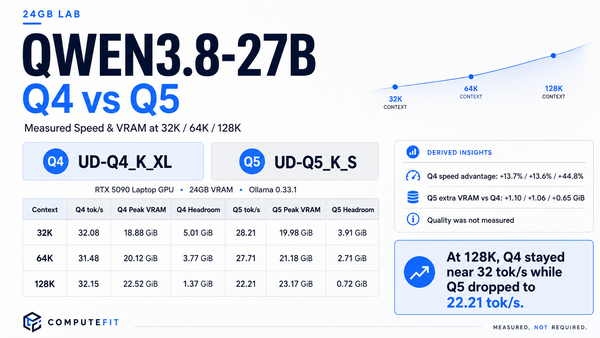
qwen3.8:latest/:27btags ship text + image input in one 18 GB tag ([official Ollama registry] at time of writing). There is nothing extra to pull for images — the vision encoder and projector travel inside that bundle. Practical consequence: your VRAM picture from the field report in this series (18.9 GB of weights on 24 GB) is what you already have to plan around; there is no separate projector file to budget on disk in the Ollama route. Image requests can still add runtime compute and memory pressure; I did not measure that overhead in this article, which is why the field report’s figures above cover text-only runs. - GPGUF via separate files (llama.cpp / LM Studio). The vision projector lives in
mmproj-F16.gguf; the quant guide in this series says the projector ships as its own file of about 928 MB on disk: for separate-GGUF workflows, image support requiresmmproj-F16.ggufto stay alongside the main model— exact runtime memory overhead was not measured here.
Sizing advice:
- You’re at ~16 GB total VRAM: the main quant math in the quant guide dominates — the separate-file setup also carries the projector file alongside the main model, and your context window has less breathing room per attached image than it does with Ollama’s 24-class setup.
- You’re at ~24 GB: the field report shows base-weights + KV headroom already fit for text workloads. Vision adds mostly request-time token load (section 3), so on a single screen or photo you’re fine; a multi-image agent conversation is where that KV pressure starts to bite, same math as long text does.
- I deliberately have no fresh measured number here — this article makes no VRAM claim beyond the vendor file sizes and the retained field-report figures it links.
5. Video: where the claim and my verification honestly diverge
The model card is emphatic — image and video, up to hour-scale video. It also ships a separate video_preprocessor_config.json in the official repo, and its own how-to notes say that file is deliberately shipped with conservative pixel settings: for full frame-rate sampling of long videos it recommends raising the longest_edge value (to 469,762,048, which it describes as corresponding to ~224k video tokens) [vendor documentation]. I pulled the shipped config and confirmed that conservative default is real: its total-pixel budget sits far below that recommended long-video figure.
Honest status:
- I did not run an end-to-end local video test on Qwen3.8-27B for this article, and none of the earlier ComputeFit posts in this series did either — so I will not quote quality or latency numbers I do not hold.
- The Ollama registry page (checked at time of writing) lists
Text + Imageinput only on every qwen3.8 tag — no video channel for the local runtime readers of this site already use daily. - If hour-scale local video understanding is the actual job, that currently means the transforms-side path: vLLM/SGLang with the preprocessor config tuned per the card’s own instructions. That is a different setup, and its real-world output quality on this 27B build is something none of my retained notes can confirm for you — I removed any guess there rather than pad the article.
6. What to do on day one
- If you are already on Ollama: you have image input by construction — the installed tag advertises
Text, Image. Send any screenshot through a normal chat request as usual and ask for its contents; compare that against anything you were doing before, e.g. OCR+summarize pipelines, to see if replacing them makes sense for your use case. - If you attach images regularly: re-check the
num_ctx/loaded-session context figure from the Ollama settings piece in this series — each attached image adds its token bill (section 3) to what text + thinking already consumes, and the loaded status value of your session is still the real ceiling. - If you are on GGUF separately: pick your main quant with the upgrade guide’s file-size math, and keep
mmproj-F16.gguf(about 928 MB on disk) available alongside the main model if attachments are actually part of your daily workflow. - If your real job is video: treat local video on this runtime as unverified on my side — do a small throwaway test with one file and one short clip before committing to it, or fall back in the video frame extraction chain you already trust. I am intentionally not writing further guidance there, because none of my saved material has actually tested that path end-to-end.