Qwen3.8-27B on a 24 GB Card With Ollama: The Defaults You Inherit and the Settings That Actually Matter
Why different context surfaces can show 262K and 131K at the same time, which Ollama defaults qwen38-27b hands you after a pull, what thinking-on-by-default costs in real use, plus a day-one checklist from one measured RTX 5090 Laptop GPU session.

1. The short answer
What do I actually have after ollama pull qwen38-27b on this 24 GB laptop?
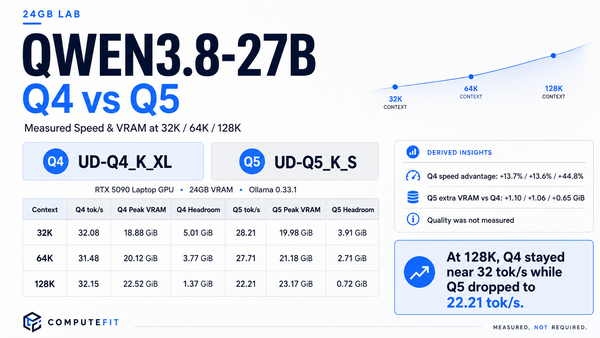
A ~18.9 GB UD-Q4_K_XL GGUF — a 4-bit-class build of the 27.3B-parameter model, according to Ollama's inventory listing.
In every VRAM checkpoint I sampled, it stayed fully GPU-resident; I observed no CPU offload on this machine.
The practical catch is headroom. In normal operation, system-wide free VRAM settled at only ≈300 MiB. Treat this as a model that effectively occupies the whole 24 GB card, not something you can casually run beside another GPU-heavy workload.
Evidence: measured on this machine; see field report §3.
What context window do I really get?
You will see two different context values depending on where you look. The vendor-native figure and Ollama's tag/inventory surface show 262,144, while my loaded session reported 131,072 at runtime.
For actual use, treat the loaded-session status as ground truth. It tells you what the running model has really been given, rather than what the model or tag supports in principle.
Evidence: measured; details in §3.
Does Qwen3.8-27B think by default?
Yes. The official model card describes thinking as enabled by default, with reasoning depth adjustable per request. Ollama inherits that behavior.
That matters when you measure latency: internal reasoning tokens can add substantial wall-clock time even when the visible answer is short. In one retained pass, the response took a low-single-digit number of minutes rather than seconds; the extra internal work is a plausible driver, although that causal attribution is an inference rather than a direct measurement.
Thinking can also be disabled per request. Section 4 covers where that trade-off makes sense in a real workflow.
Evidence: default behavior is vendor-documented; timing is measured, driver is inference.
If you only keep three things: (1) verify what your loaded session actually reports at its status endpoint instead of trusting the tag page or the marketing number; (2) on a ~24 GB card, free VRAM — not file size — is where your num_ctx decision lives; (3) apply the vendor's own recommended sampling parameters per mode. Ollama does not inherit Qwen-land defaults you might expect from other runtimes, and the model card flags that parameter support differs between frameworks.
Scope: this is a configuration reference for people who already run (or have decided on) Qwen 3.8 locally — which settings to check first, what each default means in real use, and the two numbers you can verify with one API call each. It does not re-litigate whether to switch (our upgrade-decision guide) or re-report every measurement (the full session data is in the 24 GB field report on this site; the [measured] tags below cite it).
2. What “out of the box” actually means for this model
Pulling qwen38-27b on Ollama does not hand you raw weights with no shape: it hands you a specific community GGUF and a set of defaults. Knowing each one is what separates “it pulls and answers” from “my app behaves the way I think.”
What exactly is under qwen38-27b:latest?
In this setup, Ollama resolved that local tag to a GGUF named UD-Q4_K_XL from the community Qwen3.8-27B-GGUF repository. Ollama's own inventory reported it as a 27.3B-parameter, 4-bit-class build with an on-disk size of roughly 18.9 GB.
That matters when you compare speed or VRAM use: the numbers from this machine describe a quantized 4-bit-class model, not full precision.
One naming caveat: qwen38-27b:latest is the local tag used in this setup.
It should not be read as the canonical public Ollama library tag.
Evidence: measured through Ollama's inventory endpoint; see field report §2.
Is thinking mode enabled by default?
Yes. The official model card says Qwen3.8 generates
<think>-delimited reasoning before the visible answer by default.
Ollama does not require a separate non-thinking model download. Thinking can be controlled per request instead, which is the workflow covered in section 4.
Evidence: vendor-documented behavior.
What about preserved thinking in multi-turn conversations?
The vendor-level default is also preserved thinking enabled. The model card recommends retaining historical thinking blocks for the best out-of-the-box experience, particularly in agent-style conversations.
The trade-off is context usage. Previous reasoning tokens remain part of the conversation history just like ordinary assistant text, so long-running agents can consume context faster on a VRAM-constrained machine.
Whether that behavior reaches your actual session depends on the framework or client layer in front of the model. Check that your serving path actually forwards the relevant option before relying on it.
Evidence: vendor-documented default; runtime propagation is framework-dependent.
Which sampling settings does Qwen recommend?
The official model card gives two recommended starting points:
-
Thinking mode:
temperature=1.0,top_p=0.95,top_k=20 -
Non-thinking / instruct mode:
temperature=0.7,top_p=0.80,top_k=20,presence_penalty=1.5
In my measurement session I sent plain prompts with no sampling overrides. That means the runtime's own defaults were inherited.
Before blaming unexpected output on the model itself, first check which of the model-card parameters your inference stack actually supports and honors.
Evidence: recommended values are vendor-documented; measurement session used no overrides.
Does this setup prove that vision and video work?
No. Qwen3.8-27B is released as a native vision-language model, but I did not exercise image or video input end-to-end in these Ollama runs.
So treat vision support here as a model capability, not as proof that this specific Ollama configuration and runtime version successfully route visual inputs through the full pipeline.
Evidence: model capability is vendor-documented; end-to-end visual testing was outside this measurement scope.
The pattern that matters: each of those five rows is something a different source will state differently — the tag page, another blog's pull walkthrough, and the vendor card can all be partially right. The rows you can verify yourself are cheap: inventory endpoints for row one and status endpoints for context (section 3) are single GET calls; thinking behavior you observe in any response your framework surfaces raw; sampling-parameter support is a read-through of your runtime's options list.
3. Context length: three surfaces, one ground truth
If you configure context on a Qwen 3.8 box, you will meet the same confusion I did in my measurement session: different surfaces state different sizes, and they are not all wrong.
What does 262,144 tokens actually mean?
262,144 tokens is the native context figure published for the model,
and the same number also appeared in Ollama's tag/inventory listing for
qwen38-27b:latest during this test.
That number describes what the model artifact supports in principle. It does not tell you how much context your currently loaded session has actually reserved.
The model can also be extended beyond its native window toward 1,000,000 tokens using serving-engine techniques such as YaRN-style RoPE scaling. That is a production-serving capability, not a realistic day-one operating target for a ~24 GB consumer GPU.
Evidence: native and extended limits are vendor-documented; the 262,144 Ollama inventory value was measured in this session.
So what is the 262,144 value shown by Ollama before loading?
Ollama's own inventory reported:
context_length: 262144
for the local tag used in this setup.
Think of this as a capability or shelf number. It is useful for confirming what the artifact can support, but it is not proof that the active runtime session is currently using that full window.
In other words: it is a useful upper bound, but do not configure your workload from this number alone.
Evidence: measured through Ollama's inventory surface; see field report §5.
Which context number should I actually trust?
The loaded session's own status value.
With Qwen3.8-27B already loaded under the stock settings used in this test,
the runtime reported:
context_length: 131072.
So the same Ollama setup that showed 262,144 on the shelf was actually running at 131,072 once loaded.
For real work, this loaded value is the one that matters. Your prompt, conversation history, tool results, and generated tokens all have to fit inside the context window the active session is actually using.
Practical rule: check the loaded-session status first. Treat the model-card and inventory figures as capability ceilings, not as proof of your current operating window.
Evidence: measured on the loaded session; see field report §5.
Why “asked for a big window” does not equal “running its content in that window.” My session probed explicit large context requests (num_ctx at 32K, then 65,536 and separately the ~262K-class value) containing only tiny prompts: every one of them was accepted with clean, quick responses — allocation did not refuse on a 24 GB card even when nominally asking above physical budget [measured]. The honest floor it actually proves is narrower than it looks:
- A request to reserve N tokens can be accepted while the runtime's per-session allocation and free VRAM make real use of a fraction of it. My steady-state occupancy on this card left around 300 MiB genuinely free [measured], so any plan built only on “the ask went through” is one large real-content turn away from discovering what the reservation could not actually cover.
- The KV-cache cost of a reserved window is a real VRAM line item: this model's 64-layer text stack puts full-attention layers at every-4th positions (config:
num_hidden_layers=64,full_attention_interval=4— roughly a quarter of layers produce classic per-token KV) [vendor fact from config.json, arithmetic stated as reasoning in the field report]. Even at a modest per-slot cost, a large reserved window wants GiB-class sitting on top of the ~18.9 GB weight file before runtime bookkeeping.
The one setting decision this implies: set num_ctx to the class of content you actually run at (your longest normal single prompt plus headroom for output), check free VRAM on your exact card after setting it, and if your workload routinely exceeds the loaded session figure rather than being a one-off big document — test once with real-sized content before naming the card as that workload's home. That is the entire context-decision process in two calls: read your own status endpoint, check what is actually free after deciding.
4. Thinking mode in real use: what it costs and when to stop hiding behind it
The model card is explicit about the shape of this behavior, and three named switches define your whole control surface [all vendor fact]: thinking is on by default; its depth is tunable per request with reasoning_effort; and reasoning from historical messages persists across turns via preserve_thinking, also on by default at the vendor level (which the card notes helps decision continuity in agent scenarios and improves KV-cache utilization), though whether your serving path applies that default is a framework/client question to check at yours. What it costs you in practice depends mostly on how your runtime maps those switches into requests — the model card itself says support for its parameters varies between inference frameworks, so “set enable_thinking” in Qwen-land documentation does not necessarily translate one-to-one to whatever option name your API layer exposes. Check which of the three your runtime actually forwards before assuming a switch you sent had any effect.
Lots of short turns every day: prioritize latency
If you are doing hundreds of short interactions and per-turn speed matters more than squeezing maximum reasoning out of every request, disabled or shallow thinking is the obvious place to recover wall-clock time.
There is one important configuration detail: Qwen publishes different recommended sampling settings for thinking and non-thinking modes.
-
Non-thinking:
temperature=0.7,top_p=0.80,top_k=20,presence_penalty=1.5 -
Thinking:
temperature=1.0,top_p=0.95,top_k=20
If your runtime honors these parameters, switching the reasoning mode while leaving the wrong sampling profile in place can distort the result. That can easily look like a model-quality problem when it is really a configuration mismatch.
I did not run a controlled thinking-vs-non-thinking quality A/B test in this session, so this article makes no claim about the quality gap between the two modes.
Evidence: parameter recommendations are vendor-documented; the configuration implication is inference.
Long agent runs or multi-step pipelines: prioritize getting it right
If you are running an overnight agent or a multi-step workflow where a slow turn is cheaper than a failed task, preserved thinking plus adequate generation headroom makes much more sense.
The goal is not simply to make each answer longer. It is to let the model retain useful reasoning across turns and give it enough room to finish complex work without repeatedly restarting its analysis.
The model card also publishes separate large token allocations for serving frameworks that support distinct reasoning and final-output budgets. Those are capability-level figures, not a promise that a 24 GB Ollama session can use them in full.
On consumer hardware, the practical ceiling will usually be the loaded context budget discussed in section 3 before it is the model's theoretical appetite for generation.
Evidence: model allocations are vendor-documented; workflow recommendation is inference.
Mixed daily use: use thinking selectively
For most people, this is probably the most useful setup: keep routine turns fast, then increase reasoning effort when the task actually benefits from deeper analysis.
Qwen's own guidance includes an important warning for multi-turn agent work: lower reasoning effort does not always mean lower total task time.
A faster individual response can produce weaker analysis, more failed tool calls, or more retries. Once those retries accumulate, the supposedly “faster” configuration can take longer overall.
So the useful question is not just “how many seconds does this turn take?” It is “how much time does the whole task take before I get a usable result?”
Practical rule: keep reasoning light for routine work, but do not automatically turn it down on the turns where one good decision prevents several rounds of rework.
Evidence: vendor warning on multi-turn reasoning behavior; workflow rule is practical inference.
The practical move: the card’s own framing — think by default, disable per request, tune depth rather than on/off where you can get away with it — is defensible as a starting point without me running any experiment. Decide per application surface (interactive chat vs agent runner) rather than globally across the machine, because the two have opposite economics. And separately from thinking vs not: one pass in my retained data took low-single minutes end-to-end where comparable passes were seconds [measured]; the plausible driver is internal reasoning depth on that particular turn rather than hardware — I flag it again here only so that a single slow surprise in your early runs does not get read as a broken install. If your tolerance for occasional minute-scale waits is zero, section 3’s checklist applies before you blame the model.
5. The configuration checklist I would run on day one
The ordering matters: each step either changes what the later steps can assume, or lets you delete a suspicion before it starts. None of these require leaving the machine.
Confirm exactly what Ollama pulled
Start with the inventory entry for qwen38-27b.
Record the GGUF variant it actually resolved to, its size, and the context figure
Ollama reports for that artifact.
In my setup, that meant UD-Q4_K_XL at roughly 18.9 GB.
This is the baseline for every comparison you make later. Two articles can both say “Qwen3.8-27B” while actually testing different quantizations, which makes speed, VRAM, and quality numbers non-equivalent.
Evidence: measured through Ollama's inventory endpoint.
Check the context window of the loaded session
Once the model is actually loaded, read its runtime status and note
context_length.
In my session, Ollama showed 262,144 on the shelf but 131,072 after loading.
If your application expects more context than the loaded session has actually reserved, that mismatch can explain failures before you start blaming model quality or hardware.
Practical rule: configure from the loaded value, not the shelf value.
Evidence: measured on this machine.
Set num_ctx from your real workload
Do not choose context length just because the model supports a large headline number. Start from the longest prompt and conversation history you normally expect, then leave enough room for the model's output.
After changing num_ctx, check VRAM again on the exact machine you plan
to use.
In my steady-state measurements, this model left only about 300 MiB of system-wide VRAM free. On a card that tight, an oversized context reservation may not look like a problem until the workload actually grows into it.
Evidence: VRAM figure measured; sizing rule is practical inference.
Choose the thinking policy for each application
Interactive chat and an autonomous agent do not necessarily need the same reasoning setup.
Decide explicitly whether thinking should be enabled, disabled, or reduced for each application surface instead of silently inheriting whatever defaults the client happens to send.
Where your runtime supports them, pair each reasoning mode with the sampling profile recommended for that mode rather than changing only one half of the configuration.
Evidence: mode behavior and recommended sampling profiles are vendor-documented.
Treat slow turns as measurements before calling the model slow
One unusually large prompt or one deep reasoning pass is not the same problem as sustained slowness across ordinary requests.
This test session showed that both shapes can occur on otherwise healthy hardware. So before drawing a performance conclusion, run the prompts you actually care about at the context lengths you really use.
Synthetic filler can tell you something about throughput. It cannot tell you whether your real workflow feels fast enough.
Practical rule: measure your workload first, verdict second.
Evidence: observed behavior measured; explanation of individual slow turns may be inference.
Where this leaves you: one file whose exact quant and size you can name, one loaded context figure that is actually yours, a reservation sized to evidence rather than capability claim, and a thinking posture chosen per surface with its matching parameters. Every step above costs one endpoint read or one configuration decision; none requires reproducing the measurement session on this site — that exercise earns you absolute numbers, while this checklist is what makes whatever numbers you do have mean something about your particular box. And if the real question underneath all of it turns out to be whether you should have pulled Qwen 3.8 at all instead of your current local model: that decision has its own guide here, and these settings apply once that answer is settled.