What Is llama.cpp? The Inference Engine Under Your Local Models, and When to Drive It Directly
GGUF came from llama.cpp, yet most of us meet it through a wrapper. What the engine actually exposes — server endpoints, slots, KV-cache math you can compute yourself, and the security defaults worth reading before exposing an endpoint.

If you have run a local model in the last year, you are very likely already running software built on llama.cpp — even if its name never appeared in a settings menu. It is where the GGUF file format and most of its quantization schemes began, and it remains one of the most widely deployed inference stacks for open-weight LLMs. Nearly every model tier we have benchmarked here, from sub-2GB 4-bit files to machines too small for the larger families, passed through that codebase at some point.
What llama.cpp actually is, and how do you decide between typing direct flags versus using a wrapper around it? It matters more once you stop just chatting: as soon as an agent, a GUI tool, or a custom pipeline needs your local model over HTTP, the runtime underneath stops being invisible plumbing and becomes something you configure on purpose.
A plain C/C++ inference engine
llama.cpp is, in its own words, a project whose “main goal” is to make LLM and vision-language-model inference work with minimal setup and good performance across a wide range of hardware, locally or in the cloud. The implementation itself is deliberately simple: plain C/C++ without required dependencies, built on top of the ggml tensor library.
The practical consequences are the things you actually notice:
- Quantized inference is first-class: 1.5-bit through 8-bit integer quantization for “faster inference and reduced memory use.”
- CPU support is genuinely broad rather than an afterthought: Apple Silicon via ARM NEON, Accelerate, and Metal; x86 via AVX, AVX2, AVX512, and AMX; RISC-V via RVV and related extensions. That is why a MacBook can run what your 2013 office PC also runs, slower but legitimately.
- GPU acceleration comes from per-vendor backends with different maturity levels—NVIDIA CUDA with custom kernels, AMD through HIP, Moore Threads through MUSA, plus more general routes via Vulkan and SYCL. CPU+GPU hybrid (partial offloading) is supported for models that exceed your total VRAM.
The full backend matrix from the repository's README, condensed to what local users will meet:
| Backend | Target devices (per official README) |
|---|---|
| CUDA | NVIDIA GPUs |
| HIP | AMD GPUs |
| Metal | Apple Silicon |
| Vulkan | general GPU route |
| SYCL | Intel GPUs (also OpenVINO, in progress: Intel CPUs/GPUs/NPUs) |
| CANN | Ascend NPUs |
| MUSA | Moore Threads GPUs |
| BLAS / BLIS | CPU fallback (all platforms) |
If you have used a tool that works on “almost any GPU,” that is usually the Vulkan row doing quiet work. The trade-off: backends are not equivalent in performance or polish, so hardware claims are only as good as the specific backend and driver stack involved.
The GGUF file: one container, everything inside
Nearly every “local model” you have downloaded is a GGUF file. llama.cpp defines the format that carries the quantized weights and, in its metadata header, the things the runtime actually needs at load time: architecture name, context length (tokens), tensor layout/quantization info, and — for chat models — the Jinja chat template itself.
The template detail is the part most people miss. It means two different tools can render the same conversation differently if one uses a hand-maintained copy of the prompt format while the other reads what shipped with the model file. llama.cpp's server has --jinja on by default (env: LLAMA_ARG_JINJA) so it prefers the template carried in the GGUF; you can override it with --chat-template [FILE].
A practical note for model choices: the llama.cpp server's -hf user/repo[:quant] flag pulls directly from Hugging Face. The quant suffix is optional, and per the server documentation it “default[s] to Q4_K_M”, falling back to a first available file if that name does not exist in the repo. That fallback matters more than you'd think: repos usually ship several files (Q2 through F16, sometimes custom UD_* variants), so an unpinned quant can quietly load a different file than you expected. In my own workflow I pin the quant explicitly — for example how I mapped every Qwen3.8-27B GGUF size to your card tier in our Q4 mapping article, and why context and offload flags matter more than the pull command itself when using Ollama instead (the settings that actually change behavior on a 24 GB card). The llama.cpp route is thinner: one binary, no intermediate manifest layer.
The GGUF ecosystem has a recognizable hierarchy too. The ggml organization on Hugging Face publishes official quantized files used in llama.cpp's own documentation examples (the -hf quick-start points at exactly such repos); community teams publish ladders with more granular or custom bit-widths, often under producer-specific names like “UD-Q4_K_M.” Those suffixes are the quantizer's naming convention and quality claim for that file, not part of the format specification — which is why two files calling themselves “Q4” from different producers can weigh meaningfully differently.
The HTTP server: where the agent world plugs in
The same binary serves double duty as an API server. The llama serve -hf user/repo[:quant] from the project's own quick start produces a local OpenAI-compatible endpoint, and here is why that matters for you specifically: most agent frameworks, GUIs, and RAG pipelines do not speak GGUF — they speak /v1/chat/completions.
From the official server documentation, the supported surface includes:
- OpenAI-compatible endpoints.
/v1/modelsand/v1/chat/completions, alongside legacy native ones such as/completion. If a tool “works with any OpenAI endpoint”, it works here: point its base URL at your machine. - Tool calling and structured output. The chat API documents
tools/tool_choice, including parallel (multiple) tool calls on models whose template supports them, and JSON schema constrained generation viaresponse_format— the mechanism that keeps an agent's emitted arguments valid without retry loops. - Inference slots. Concurrent conversations run in a limited set of prompt-cache slots (
-np/--parallel, default auto). Each slot maintains its own KV cache, so “N parallel chats” is not free: every active slot holds memory proportional to context.--metrics(Prometheus-compatible) exposes per-slot speed and processed-token figures if you want numbers instead of vibes; /slots gives the live processing state without it. - Multimodal input. A projector file (
-mm/--mmproj FILE) enables image support for vision-language models — fetched automatically when you use-hf, and GPU offload is on by default. If you have followed the Qwen3.8-27B pieces here, most of that piece's vision-token math transfers directly: it describes what each image costs in tokens under Ollama's serving path; the same order applies when you serve that projector through llama.cpp yourself.
The security defaults are unglamorous and worth reading slowly:
| Setting | Default (official server documentation) | What that means for agent use |
|---|---|---|
--host | 127.0.0.1 | You opted out of remote access by default. If a LAN-wide agent fleet wants the model, make that decision deliberately — with --api-key KEY in mind (comma-separated list or file-based) — rather than discovering the exposure at browser time. |
--port | 8080 | Pick something you will remember; scripts and agents hard-code it into their configuration. |
Built-in tool execution (--tools TOOL1,TOOL2,…) | disabled | The built-in tool features are documented for AI agent use with an explicit warning not to enable them in untrusted environments. A local endpoint that can run shell commands or write files acts at your privilege level — keep these off on anything reachable beyond your own trusted workstation. |
| CORS | allow all origins | Browsers will call it happily from any origin. Convenient for local development, and another reason this should sit behind --api-key the moment it leaves 127.0.0.1. |
The one-liner that keeps coming back in agent discussions: the tool does not replace your operating-system boundaries. A model served locally still executes with whatever privileges you granted. If it needs to read files and call APIs from /proc context, that is a design decision about trust scope made once — before any endpoint exists.
One of the strongest reasons this article exists in our catalog: we used exactly this serving pattern when we stood up Claude Code against Ollama on a local 24 GB card. That piece documents which environment variables actually matter and how Anthropic API compatibility behaves over this class of endpoint.
The memory you actually have to budget for
“Which quant fits?” is the question we keep answering here, and llama.cpp's flag set is where the answer gets verified. Three settings dominate on consumer GPUs (defaults from the server document):
-ngl, --n-gpu-layers N: how many layers live in VRAM — an exact number,auto, orall; default is auto.-c, --ctx-size N: prompt context window in tokens; default0means the value loads from the model's own metadata (this is why your “native” 256K-capable model can boot with a far smaller live context when nothing overrides it).-fit: llama.cpp will, by default (on), adjust unset arguments down so the model plus KV cache fit within device memory — floored at--fit-ctx, minimum context of 4096 tokens. A server that starts cleanly is not proof you are getting your desired quant + full context: when a model does not fit, something gave.-fa, --flash-attn [on|off|auto]: flash attention mode, default auto; where supported it reduces the per-token KV cache cost versus the naive path. Whether your configuration actually enables one of those paths is an environment question (backend + kernel level), so “I set-fa on” and I measured N GiB less KV are different claims.
The KV-cache number itself is not a black box — it computes in three lines from the fields published with every model's architecture config. Per token, at Fp16: (K+V combined) = 2 sides × layers × kv-heads × head_dim elements × bytes-per-element. Grouped-query attention (GQA) reduces kv-heads below the full attention-head count, so two models with identical layer counts can differ several-fold in KV cost per token.
The following numbers were computed from the model architecture config that ships in Qwen's own Hugging Face repo metadata (Qwen3.8-2.4T-A95B — read once during this research pass): num_hidden_layers=92, num_attention_heads=64, head_dim=256, and only 4 GQA KV heads. Multiplying out: 2 sides × 92 layers × 4 kv-heads × 256 elements = 188,416 bytes per token (K and V combined at Fp16). Live KV cache for one active conversation:
| Active context | Fp16 KV-cache memory (computed) |
|---|---|
| 8,192 tokens — about one long document or a medium agent session | ≈ 1.4 GiB |
| 16,384 tokens | ≈ 2.9 GiB |
| 32,768 tokens | ≈ 5.8 GiB |
Treat that as the full-precision baseline only: where a backend implements flash attention (the -fa on route) or quantized cache storage, the effective per-token cost is lower — by how much depends on your configuration and backend, and I have not measured it for that specific model here, so no number for those paths.
The bigger point: agent workloads accumulate tool results into context over many turns. By turn 40 of a coding session the KV cache is measurably larger than what a first-boot test ever exercises. And because each server slot maintains its own prompt cache (-np), three simultaneous scripts talking to one endpoint multiply that budget — which is precisely why I always check /slots rather than guess when an agent feels slow.
This calculation covers only what the attention layers store. It does not include quantized model weights (per-tier mapping: our Qwen3.8-27B quant-to-GPU article), runtime overhead, or multimodal projectors. That is why a machine can “load” the file without room to serve it properly at its working context length — our hardware sizing guide works that headroom question out across the 8-to-48GB tiers, and when all local tiers are exhausted, renting temporary compute is the decision framework in our RunPod vs Vast comparison.
Wrapper or direct: deciding which layer you want
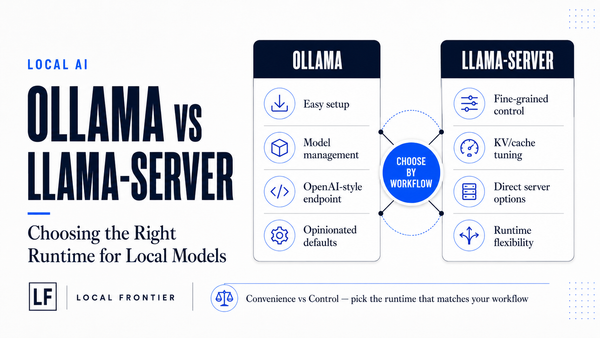
Ollama exists to delete a lot of exactly these decisions: model library, quant resolution, process management. LM Studio sells the same idea as something you can click at lunch time. Both are good products.
The direct llama.cpp path buys back two specific things, neither of which shows up in a chat demo:
- Deterministic loading. With
-m model.gguf -c 32768, the file you pointed at is exactly what starts — no manifest layer that could resolve a tag to a different file’s name under your nose. When debugging performance drift, removing an intermediate translation step matters. - Flag-level control where defaults stop being enough. The server documentation lists dozens of documented switches, each with an environment-variable override (the
LLAMA_ARG_*/LLAMA_*family), so a systemd unit or scheduler wrapper can keep the whole configuration in one place. A few that matter for sustained agent work:
| Switch (official description, abridged) | Why agents care |
|---|---|
-np/--parallel N, server slots; default auto (LLAMA_ARG_N_PARALLEL) | A practical limit on concurrent conversations that hold KV caches. One scripted agent? Pin a small number explicitly. |
--reasoning [on|off|auto] (default auto, detected from the chat template); plus --reasoning-effort LEVEL and a --reasoning-budget N token cap for thinking; defaults set by the model’s own template | The off switch for thinking-style models is explicit here, and a budget makes per-turn reasoning latency something you control rather than whatever the template decides. |
--api-key KEY, comma-separated list or file-based; default none (i.e. unauthenticated) | The moment an endpoint leaves loopback it gets a key on the same day — not as an afterthought during browser testing. |
Prompt-cache persistence via /slots/{id}?action=save|restore; Prometheus metrics behind --metrics (default off) | Snapshotted slot caches let long agent sessions survive a restart instead of re-embedding hours of conversation; /metrics gives real tokens-per-second numbers for the “is it slower than last Monday?” question. |
The honest trade-off: for casual daily chat, a wrapper almost always wins on first-prompt time. The moment you are scripting against an endpoint, running more than one model, or need deterministic control over quant/context/parallelism — direct earns its setup cost.
A decision rule that has kept holding up in my own machine: if some tool or pipeline is pointing a chat-completions URL at your box and expects you to tune context, parallelism, or memory by editing files rather than clicking checkboxes — run it directly through llama.cpp’s server. If the user is a person typing into something at lunch break, keep them on Ollama. For how that wrapper route specifically behaves with coding agents, see running Claude Code against a local endpoint.
A five-minute direct start (and what to check when it is up)
The current quick start, straight from the repository README, needs only an installed binary:
# interactive CLI, pulled directly from Hugging Face
llama cli -hf ggml-org/Qwen3.5-0.8B-GGUF

# OpenAI-compatible API server (built-in web UI at /)
llama serve -hf ggml-org/Qwen3.5-0.8B-GGUF
If you already keep models on disk, -m path/to/file.gguf -c 32768 --port 11500 is the whole command for a pinned session; add --api-key KEY1,key2 before anything leaves loopback.
The four things I verify every time a direct box comes up:
- /health and /v1/models respond, and the model listing shows the quant name you expected.
- Loaded KV cache size as printed on startup, with the context value it actually took (including whether
-fitadjusted something down). - A short completion at temperature 0 repeats — deterministic behavior is the first signal that layer offload and template application came out sane.
- If multimodal: one image round-trip, confirming the projector file was actually found (a “running” server with a silently missing
-mmfile will happily ignore images rather than error).
Conclusion
llama.cpp is less a tool you add to your stack than the layer most of it already runs on: GGUF in, quantized tensor computation out, with an OpenAI-compatible server that everything agent-related can point at. The wrapper-versus-direct question resolves itself quickly — wrappers for interactive use, direct flags when scripts and long-running agents need deterministic memory, context, and parallelism behavior.
The parts worth internalizing are not the flag list at all: KV cache cost is a computable number from public model metadata (and grows with every turn of an agent conversation), each server slot multiplies it, -fit can silently reshape what you asked for when memory runs short, and loopback default + no API key is a good baseline to extend deliberately rather than inherit accidentally. Model releases here on ComputeFit — in the spirit of how we covered Ornith-1.5's long-context math or which Qwen3.8-27B quant fits your card — are most useful read against exactly this runtime: same model file, different flag set, and often very different usable VRAM budget.
Sources cited in-line throughout: ggml-org/llama.cpp README (description, features, backend table); tools/server README (options with defaults, API endpoint documentation). The Qwen3.8-2.4T-A95B KV-cache figures are computed from the architecture values its own Hugging Face config metadata publishes — a number I can recompute for you if you run it through any LLM.