The Hidden Cost of Context Length: Why Your Local Model Runs Out of Memory Before It Reads a Single Token
Raising context windows does not fit the same memory it used to. The KV cache is allocated in full before your first token, its size is computable from the model's config file, and hybrid-attention models change the number quietly.

The short version
Your model weights are not the whole memory bill. Every loaded session also sets aside a buffer to back up its context window — the KV cache — and runtimes like Ollama's allocate this reservation all at once, sized to the context length you have asked for in that session (community reports describe the allocation happening at load time rather than gradually as conversation tokens arrive during inference). Double the context length you requested and that reserved block roughly doubles with it; on a tight card that can be one or two gigabytes at common settings. The mechanism is still just "memory already claimed against your VRAM budget before any real content gets processed," which lines up cleanly with Ollama's own guidance quoted below.
The good news: this buffer has a published formula. Its size depends on four numbers from the model's own config file — layer count, number of key-value heads, head dimension, and your context length — so you can compute it before loading anything. The second surprise hidden in that same file: modern hybrid-attention models like Qwen3.8 keep only a minority of layers as classic full attention, which makes their KV buffer much smaller per reserved token than an old-school dense model with more full-attention layers.
If you have hit "out of memory" while raising num_ctx, or wondered why a 24 GB card that loads its weights comfortably still refuses long conversations, this is the mechanism. The calculation below takes about two minutes for any model you already run, and it changes how much context is actually practical on exactly your setup compared with what a model card advertises.
The three numbers everyone confuses
"Context length" appears in local LLM discussions as if it were one property of one thing. It isn't. At least three different quantities share the name, and they live at different layers:
- The model's native context — what the trained weights can attend to in principle (e.g., 262,144 tokens for Qwen3.8-27B per its published config).
- The window a loaded session has actually reserved — how much attention state the runtime is holding in VRAM right now for your active conversation.
- Your working context — what you actually fit: system prompt, message history, tool outputs, and room left for the answer.
The confusion that produces OOM errors comes from planning around number one when your hardware is really constrained by number two. A model card can advertise 128K or 262K tokens while a loaded session on your machine reserves far less, because reservation costs memory that arrives on top of the weight file — which is already occupying most of your video memory.
Ollama's context-length documentation states this directly:
"Setting a larger context length will increase the amount of memory required to run a model. Ensure you have enough VRAM available to increase the context length."
The same page documents how defaults vary by hardware tier — for example, 32k context on 24–48 GiB cards and 256k on 48 GiB and up — and that cloud models served from Ollama's library run at their maximum context by default. Which concrete default applies to a given session also depends on the individual model entry, so if two people report different "default context" values for similar hardware, nobody is necessarily wrong.
What the KV cache actually holds
When a model reads your conversation, each full-attention layer produces key and value tensors for every token it has seen. Recomputing them from scratch on every generated token would be quadratically wasteful, so runtimes such as the llama.cpp-based engine Ollama drives store them incrementally in a dedicated memory block: the key-value (KV) cache.
The amount stored per layer scales with three model-declared factors:
- Number of heads that hold their own K/V state. Most modern models use grouped-query attention, where every query head shares a much smaller set of key-value heads — often 4 to 12. That number dominates the formula far more than total head count does.
- Head dimension — how many floats each attention slot holds per head; for standard full-attention layers this is hidden / query-heads (or stated directly in the config).
- How many layers do classic full attention at all. This is where architecture quietly changes everything, as the worked examples below show: hybrid models with linear-attention layers only pay per-token K/V cost on a fraction of their depth.
Multiply those across every caching layer's context window, then account for precision: most runtimes keep these buffers in two-byte (half- or bfloat16-class) values, so each counted unit takes 2 bytes for its K entry plus 2 bytes for its V — one constant factor of four that compounds fast once the token count grows.
The formula you can compute yourself
Pulled together (assuming the cache holds values in two-byte half/bfloat16-class entries, which is what most runtimes use by default for KV state):
- KV memory ≈ layers × kv_heads × head_dim × context_tokens × 4 bytes.
Every variable except the last sits in one file — the model's official config.json on its Hugging Face page. Context is simply the number you set. Two worked examples:
Example 1: Mistral-7B-Instruct-v0.3 (classic grouped-query attention)
Its public config declares 32 layers of full attention, 8 key-value heads, and a head dimension of hidden 4096 ÷ 32 query-heads = 128. That is:
32 × 8 × 128 × 4 bytes ≈ 0.125 MiB of KV cache per reserved token.
| Reserved context | Estimate at f16 (from that one number above) |
|---|---|
| 4,096 tokens | ≈ 0.5 GiB of cache alone |
| 8,192 | ≈ 1.0 GiB |
| 32,768 | ≈ 4.0 GiB — a meaningful chunk of a consumer card's VRAM before any actual content is read |
| 65,536 | ≈ 8.0 GiB for the cache alone — often more than several model weight files cost to load on their own |
The arithmetic was done from the four config numbers above with ordinary multiplication; exact runtimes may add buffer-alignment overhead on top, but every row holds up as an order-of-magnitude planning target. The point to carry forward: a 7B-class model can legitimately want single-digit-gigabyte chunks of headroom purely for context, which is why "weights fit in VRAM" alone never implies the session will run without OOM.
Example 2: Qwen3.8-27B (hybrid attention, fewer layers paying full price)
This model looks heavier than Mistral-7B by raw parameter count and file size, but its context math works differently in a way most guides never point to. Its published config declares 64 layers total — yet only 16 of them are classic full attention (the other 48 use linear-attention blocks that do not accumulate the same per-token K/V state), and it carries just 4 key-value heads with a head dimension stated directly as 256. The formula above, applied to exactly those caching layers:
16 × 4 × 256 × 4 bytes ≈ 0.0625 MiB of KV cache per reserved token (for the full-attention portion)
To be honest about precision before you lean on that: linear attention still has its own memory footprint — state for the recurrent/linear part of those other 48 layers depends more on batch behavior and windowing than the classic per-token K/V pattern, and I have seen no single official figure pinning down its exact size at large context right now. Treat "0.0625 MiB/token" as a lower-bound framing of Qwen3.8's cache cost for the portion I can verify from config alone: directionally correct, but possibly understated once all state is counted.
The practical conclusion either way stands firm: two models advertised at the same headline context number can carry meaningfully different real-memory costs on an identical GPU, purely from their layer architecture — and you only see that difference clearly by reading each model's config file rather than its marketing blurb.
What this buys in practice, one 24 GB example
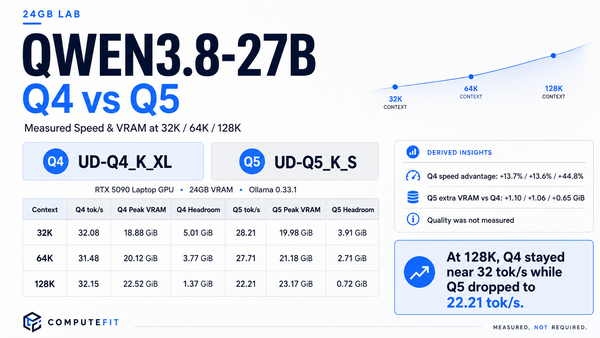
Say the weights of a Qwen3.8-27B-class build land at roughly 15–19 GiB on your card (which quant you chose determines where in that range — covered separately in the quant-choice guide for this file size). Against a 24 GB GPU, the numbers land somewhere like:
- You requested about 4–8K context. The KV-cache contribution is small — well under roughly half again the weight file's share of the budget even at the dense-model rate in Example 1, and much lower still given Qwen3.8's hybrid architecture. On this path your real binding constraint was almost certainly the weights themselves all along; context size wasn't eating anything interesting yet.
- You asked for ~32K on a fully dense (non-hybrid) model. That's roughly 4 GiB of cache reservation alone at the Example 1 rate — often enough to push total demand past your free VRAM ceiling and produce an OOM that "the weight file clearly fits" would never predict.
- You're considering 65K–128K on a mainstream card. Stop guessing: run the formula. If computed cache-plus-weights exceeds real available headroom, you will hit OOM eventually rather than on some specific single mega-prompt. Practical options, in roughly this order of convenience based on what most people already have access to — pick a lower-but-honest context size for your actual workload classes; confirm against the official hardware-sizing guidance if that's genuinely where your needs are landing (How Much Hardware Do You Need for Local AI Agents?); or, if the workload routinely needs long context more often than a one-off big document — that's usually when it becomes worth reaching for cheap cloud-GPU fallback rather than overpaying in VRAM on your daily driver machine (RunPod vs Vast.ai for Local AI).
The settings that actually move this number (Ollama)
You don't have to live with whatever default reservation your Ollama install picked. A few dials, all from the official docs:
- num_ctx — the primary Modelfile parameter for setting context window size per model; this is the number that scales the whole cache line linearly, so it's what you raise deliberately for agent-heavy or long-document sessions rather than casual conversation.
- OLLAMA_CONTEXT_LENGTH, set when starting ollama serve — a server-wide value Ollama applies by default to any session created without an explicit per-session/Modelfile override; useful if you just want one environment-level baseline rather than managing the exact number across many different model builds.
- The specific model you choose itself has now become part of the memory decision, not just a capability pick — as Example 2 demonstrates, two models can request the same nominal context with different real VRAM costs depending on their layer-attention architecture; if that difference matters to your exact card's headroom budget, it's worth one careful read of each candidate's config file rather than relying only on headline parameter counts.
- KV-cache quantization and flash-attention-style attention kernels, where a given runtime version explicitly supports them for the model in question; I'm keeping this to a couple of sentences on purpose, because how much it saves you depends very specifically on runtime version plus model support, and there is no single official figure covering that whole grid reliably right now — check your chosen server's own documentation if compressing the cache itself (rather than shrinking the window at all) is what you actually want to pursue.
A two-step check before committing to a context target
- Read the config file first. Pull the model's official Hugging Face config page, note how many layers there are in total, how many of those hold an independent full-attention K/V state (usually every layer for older designs, a minority for recent hybrid ones), the key-value head count and head dimension — plus whether any linear/hybrid variant reduces that fraction. That's roughly 4–6 concrete numbers, not a vague research project.
- Calculate KV cache at your intended context (two bytes per cached value, matching Examples 1 and 2; scale down if your runtime explicitly documents a smaller cache dtype), add it to the model file size plus overhead from anything else sharing that card, and subtract from total VRAM. If what's left is a comfortable headroom — not right at the exact limit — keep using a conservative floor like the one I aimed for in Qwen 3.8 on Ollama: The Defaults You Inherit and the Settings That Actually Matter rather than chasing a hair's-breadth of extra available context that mathematically "just fits."
When to raise context, and when to walk it back down
Ollama's own documentation gives you the rule: tasks like web search, agentic coding workflows, or other tool-heavy multi-turn flows are exactly where larger windows earn their keep (the doc points to "at least" 64K in that framing), whereas plain conversational chat almost never needs much more than a few thousand tokens — and hitting OOM at 3–5 prompt turns does you zero good once context has grown past what your specific hardware can absorb sustainably. The working rule of thumb: right-size context around the actual size of the largest prompt+completion that occurs in your day-to-day workloads, not around whichever maximum value the model's card technically advertises, because "what this model is capable of reading" and "what my particular GPU can comfortably hold for as an active session" are two separate questions.
Conclusion
The KV cache is where context length stops being an abstract number on a spec sheet and starts physically occupying your VRAM — at load time, before any actual content gets processed, and (for typical consumer-card budgets) it's already nontrivially sized by the time you're setting anything beyond "just enough for my real prompts, plus a little breathing room."
You can compute that number yourself in under two minutes using nothing but a model's published config file; that same config also tells you when a modern hybrid-attention design quietly shrinks (or complicates) its baseline cost versus an older dense build doing everything the hard way. Get into the habit of running this single check before bumping context up — and always trust the loaded session's actual reserved value over shelf-listed numbers from model cards or inventory screenshots — and much of the "fits fine, then starts OOM'ing as I push my prompts longer" surprise vanishes. Next time you're staring at a 24GB card refusing to load one more gigabyte of context: don't guess about it anymore — read the config file first.